

How to Write a Check? Steps to Print Checks from Home
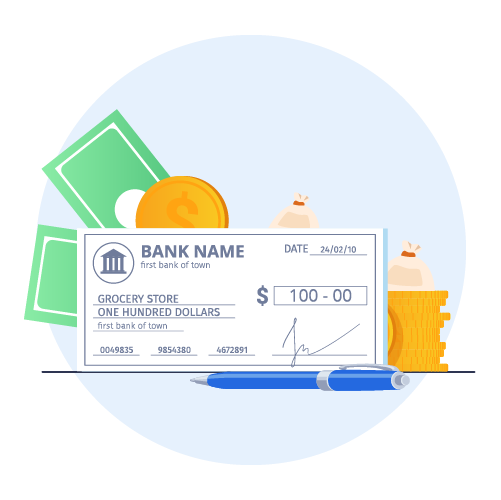
Writing a check is a straightforward process, but you must fill out the necessary sections with appropriate information. Start with a blank paper stock and write down the date. Mention the recipient’s name, and payment amount in numbers and words, create a memo if you want, and sign the check.
Business checks also have many security features necessary to avoid tampering and fraud. Using an online check writer solution is a better alternative if you frequently deal with a large volume of checks.
TL;DR
- Checks are still a widely used method for payments despite the rise of electronic transactions.
- Security features like MICR technology, watermarks, and holograms help prevent check fraud.
- Online check writer solutions offer convenience, flexibility, and cost savings for businesses.
- Knowing how to properly write and secure checks is essential for both individuals and organizations.
Key Takeaways
- Individuals and organizations can use checks to make payments, transfer money, or send gifts
- Check payments are still popular despite growing electronic transactions
- MICR technology uses magnetically sensitive ink to print characters on checks for security
- Many business checks use watermarks and microprinting to stop counterfeiting
- An online check writer solution provides convenience, flexibility, and personalization.
What is a Check?
A check is a written document an account holder directs to a bank or financial institution to pay a specific amount of money to a recipient. This financial instrument helps two or more parties arrange a financial transaction without using physical currency.
The payer must write a check to inform a bank to transfer money from one account to another. Individuals and businesses use checks to make payments, reward as a gift, or transfer money between two entities. Despite the growth of electronic transactions, checks are still popular among various industries. If a check is lost or stolen, no one can cash the check without authorization.
💡Also Read: Understanding Digital Checks

How to Write a Check?
Filling out a check is straightforward and requires minimum hassle. You only need to start with a blank check stock to write the necessary particulars.
Include a Date
Start by writing the date on the top-right corner of the check. This is a critical step in informing the bank and the recipient when you write the check. The date helps in record-keeping and auditing.
 Also Read: What is an Online Check Maker?
Mention the Recipient
Use the “Pay to the order of” line to mention the name of the individual or organization you want to pay. Write “cash” if you are unaware of the person or organization’s exact name. However, this practice could be risky if the check gets stolen or lost. Any unauthorized individual can cash or deposit the check to get their hands on your hard-earned money.
Write the Amount in Numbers
There are two places to write down the amount of payments. You must write the total amount numerically in the tiny box on the right. (For example, $510.66) Ensure the writing is visible so the ATM or the bank can accurately read and deduct this amount from your account.
Write the Payment in Words
To avoid confusion, you also need to write the numerical dollar amount in words right below the “Pay to the order of.” For example, if you are paying $510.66, you will write “Five hundred ten and 66/100”. Put the cents over 100 if you want to write a check with cents. It helps banks to confirm the correct payment total when you write the dollar amount in words.
Write a Memo
A memo in your checks is optional. But it helps you know why you wrote the check. For example, checks for monthly electric bills or rent can have a memo saying “Electric Bill” or “Monthly rent.” Sometimes, while paying your bill, a company might demand that you provide your account number in the memo area.
💡Also Read: Syncing Digital Checks with Accounting Software
Sign the Check
Please sign your name on the bottom-right corner of the check. The signature must be the same as the one associated with the bank account. This indicates that you agree to pay the mentioned amount to the correct payee.
Security Features in Business Check Stock
Ensuring the security of financial instruments is critical for businesses. Checks play a vital role in transactions and payments, and only advanced security features can guarantee their safety and integrity.
Watermarks and Microprinting
These elements are only visible under specific conditions. Only banks and some financial institutions can verify watermarks and microprinting, making it harder for counterfeiters to replicate the checks. Standard copying or scanning equipment cannot read or reproduce the tiny text on these checks.
Security Holograms
Many modern business checks have built-in security holograms. These multidimensional images on the check paper require specialized equipment to replicate, making it difficult for counterfeiters to replicate checks with these unique security holograms.
Chemical Reactive Paper
This specialized type of paper reacts to chemicals in various attempts to tamper with the check. It makes the check wash out or completely unreadable, adding an extra layer of protection. Banks and financial institutions would simply reject checks if they witnessed a check with a chemical reaction.
Check Tampering Prevention
Some business checks also have advanced features like void pantographs. If someone tries to alter or tamper with the check, it creates a “void” pattern.
Also Read: What is the Format of a Blank Check TemplateMagnetic Ink Character Recognition (MICR)
This technology uses magnetically sensitive ink to print characters on checks. It helps automated systems process the check numbers easily, reducing the chances of errors and fraud.
Tips for Handling Common Check Situations
Digital banking may be on the rise, but paper checks are still prevalent. So, paper check issues still come up as well. Here’s how to tackle the most common check-related scenarios:
Lost Checks
If you misplace a check you wrote or received, the first thing to do is to contact your bank immediately to stop the payment. This will ensure that whoever finds that check cannot cash it. Additionally, knowing the check number will speed up the process.
Stolen Checks
If you’re doubting that your check has been stolen, raise a fraud alert with your bank immediately. The bank may close your chequebook series and give you a new account number for extra security.
Damaged Checks
Human tellers and scanners at the bank are both trained to reject damaged or smudged checks. A check with unreadable details makes it void. If you are on the receiving end of a damaged check, ask the issuer for a replacement as soon as possible.
Incorrect Checks
Mismatched amounts, spelling mistakes, and wrong routing numbers can delay check processing. In case this happens, void the check and write a fresh one. Overwriting or corrections increase the risk of your check being rejected.
Check Cancellation
If you have written and sent the check and then need to reverse the payment, initiate a stop payment. It can only be done as long as the receiver has not cashed the check. Stop payments can stay eligible for six months.
Late Arrival or No-Delivery
Ask the receiver to confirm the delivery. If the check isn’t delivered in a reasonable timeframe, stop the payment and issue a new check.
Duplicate Checks
It is a good practice to keep a record of every check you issue. Use a manual or digital check register to track numbers, dates, and recipient information.
Also Read: How to Void a Check?Use an Online Check Writer Tool to Print Your Own Checks
Writing checks manually might not be feasible for businesses that handle high-volume paper checks. Some organizations already have dedicated in-house mailrooms with printers to write and print checks to ensure higher security and convenience. However, a third-party vendor provides numerous benefits, such as;
Customization and Brand Opportunities
An online check writer solution helps you maintain consistent branding by customizing logos, colors, fonts, layouts, and other elements. This level of personalization is essential to add a professional touch to your financial transactions, leading to a lasting impression on recipients while you print a check.
Convenience and Flexibility
Printing checks on demand is a massive convenience for individuals and businesses. You don’t need to visit the bank or wait for check orders to arrive via mail. Cloud-based software makes it incredibly easy to produce from the comfort of their home, workplace, or any remote location with internet access.
This convenience helps to make urgent payments by instantly printing and mailing checks to the recipients. It could be an ideal solution for paying bills, managing payrolls, and making client payments. This approach reduces the dependence on the physical transportation of checkbooks and reduces paper wastage. There's no need to use pre-printed checks, produce checks only when you want to print them.
Higher Cost-Efficiency and Savings
In-house check printing involves shipping expenses, stationeries, third-party fees, and potential delays. In contrast, an online check writer solution helps businesses print personalized checks with minimal additional expenditures.
They often feature a pay-as-you-go model to ensure that you only pay for the services you use. It is an incredibly cost-effective option for businesses that need to print checks and avoid unnecessary expenses.
Easy Integration and Compatibility
Most businesses use financial systems to track their financial transactions. A cloud-based online check-writer solution comes with native integrations for accounting platforms. It makes managing transactions simple and setting up custom workflows to print and send checks on demand. They can continue using their accounting software while reaping the benefits of in-house check printing.
Also Read: How to Mail a Check Safely by mail Incredible Support and Customer Service
Most check printing software prioritizes strong support channels, tutorials, and API guides for quick integrations. Thus, you will always have the resources handy to maximize the platform’s potential. Find a service provider that focuses on security, automation, personalization, and flexibility with its platform.
How Can PostGrid Help You With Online Check Printing?
A comprehensive solution that allows you to design, print, and send checks is vital to ensure smoother financial transactions. PostGrid’s check API helps you avoid manually writing and printing checks. Your business can ensure higher accuracy, security, and deliverability. We help you keep every record, track your checks, and never miss a payment date.
Native integrations with accounting software like QuickBooks are the perfect solution to automate everything from check writing to delivering them. It auto-fills the necessary data in your checks to minimize manual intervention and errors. Keep your accounts up-to-date and make timely payments with our powerful online check writer solution! Sign up to automate check writing, printing, and mailing with our reliable check API!